CodeShelf
A local, zero-dependency dashboard to monitor, search, and reply to your Claude Code sessions — grouped by status, not alphabetically.
 Node.js · macOS · zero dependencies · MIT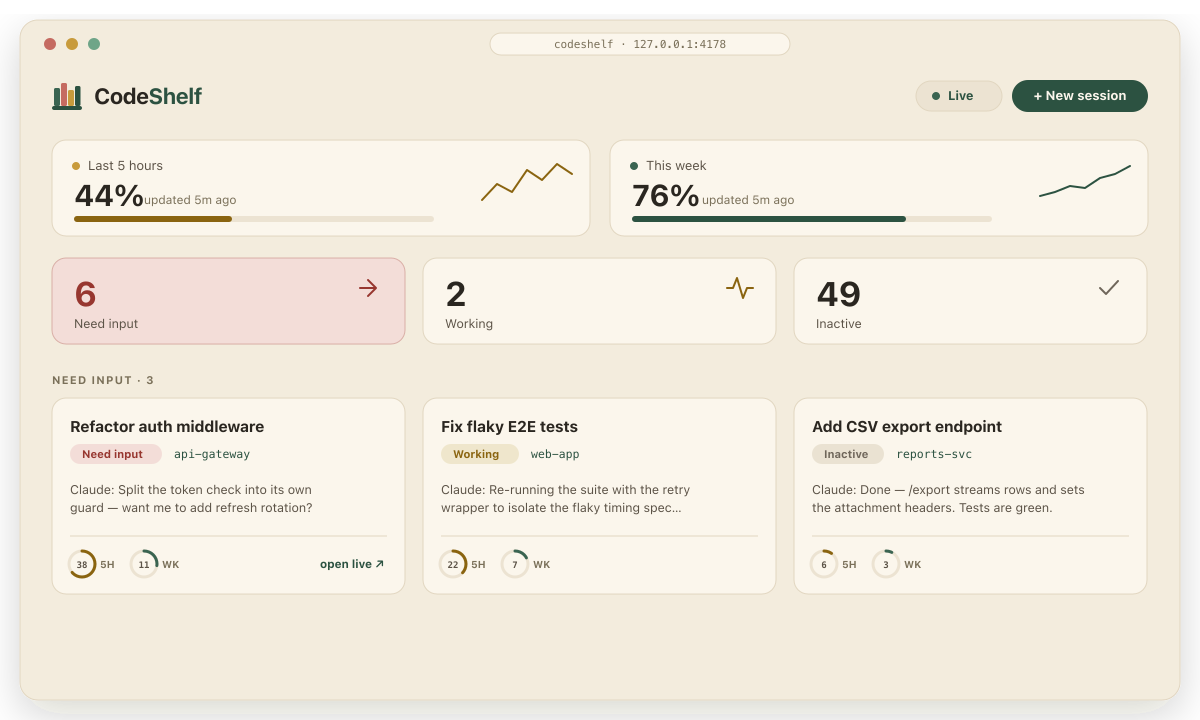
CodeShelf is a tiny, local, open-source web app that turns the files Claude Code already keeps on my Mac into a live mission-control: one page that shows which sessions are working, which are waiting on me, and which are closed — and lets me browse, search, filter, and reply to any of them without hunting through terminal tabs.
The problem it solves
Claude Code lists sessions alphabetically. That is fine for one or two, but once five, ten, or twenty agents are running at once, alphabetical order tells you nothing about what actually needs you. You end up cycling through terminal tabs asking the same question over and over: which one is blocked on me right now? I built CodeShelf because I run many sessions in parallel and wanted to actually keep up with all of them.
CodeShelf reorders everything around status, not spelling. Sessions that need input float to the top, working agents are clearly marked busy, and inactive ones get out of the way — so instead of scanning names, I glance once and know where to go next.
What it does
- A live session board, grouped by status, with Need input / Working / Inactive signal tiles you can click to filter. Status always shows as icon + text + colour, never colour alone.
- Full-text search across every past conversation, with highlighted hits and a Mine-only view of just the prompts I typed.
- A reply box that types straight into the live Claude Code window — so the reply also shows up on Remote Control and my phone — or runs a headless turn when the session is already closed.
- Plan-usage meters (the 5-hour and weekly windows) up top, and per-session usage donuts on each card.
- Pinning, project filters, auto-refresh, and Markdown-rendered transcripts (headings, tables, code blocks, collapsible tool steps).
How it’s built
It is deliberately minimal: a single server.js with zero dependencies (no npm install), it binds to loopback only (local-only by design), and it is read-only against ~/.claude — the one thing it ever writes is a reply I send on purpose.
git clone https://github.com/muhammad-hassnain/codeshelf.git
cd codeshelf
node server.js        # then open http://127.0.0.1:4178
No build step, no dependencies — just Node 18+. The code lives on GitHub.